

Truck Parts Identification App
A mobile app that identifies truck parts from photos and asks when it is unsure
About the project
- Client: a supplier of heavy-truck parts (name not disclosed)
- Industry: Commercial vehicles and spare parts
- Part types: air springs, disc brake pads, brake camshafts
- Technologies: Flutter, FastAPI, LangGraph, PostgreSQL, Docker, Claude API
- Status: working system, checked on real parts
We built a truck parts identification app that names a part from photos. A specialist stands in a workshop with the part in hand, and the question is simple: which catalog item is it?
However, heavy-truck parts make the answer hard, and a general image classifier does not cope. So our app also knows when the photos are not enough. In that case it asks a question instead of guessing.
What we delivered
THE CHALLENGE
- A left and a right camshaft are mirror images.
- Many parts carry no catalog number, only a code punched into the plate.
- Two different parts can differ by less than a measurement tolerance.
THE SOLUTION
- The AI observes and describes the part with confidence levels.
- Rules decide from the catalog and a written protocol.
- Evidence first: only verifiable evidence identifies a part.
- Questions replace guesses.
- Honest results: identified, close matches or not identified.
KEY RESULTS
- 53% less time per scan than the earlier version.
- 59% lower cost per scan.
- Part type correct on 22 of 22 test photos.
- Four pads, two air springs and three camshafts checked on real parts.
- More than 500 automated tests, all offline.
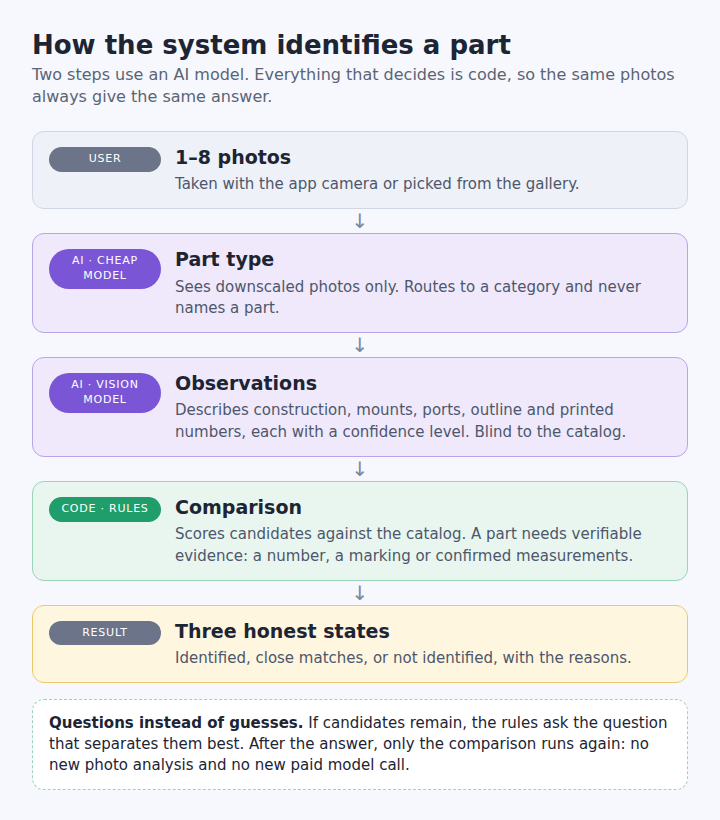
The AI only observes. Fixed rules decide, so the same photos always give the same answer.
The key idea of truck parts identification: the AI observes, rules decide
Instead of asking one model "which part is this?", we split the work in two. First, a vision model only describes what it sees: the construction, the number of mounts, the ports, the outline and any printed numbers. Each observation carries a confidence level and a source.
Then fixed rules in code decide which catalog item fits. The model that describes the part never sees the catalog, so it cannot fit its description to an expected answer. As a result, the same photos always lead to the same decision. In addition, we can test every rule automatically, without paid model calls.
How it works for the user
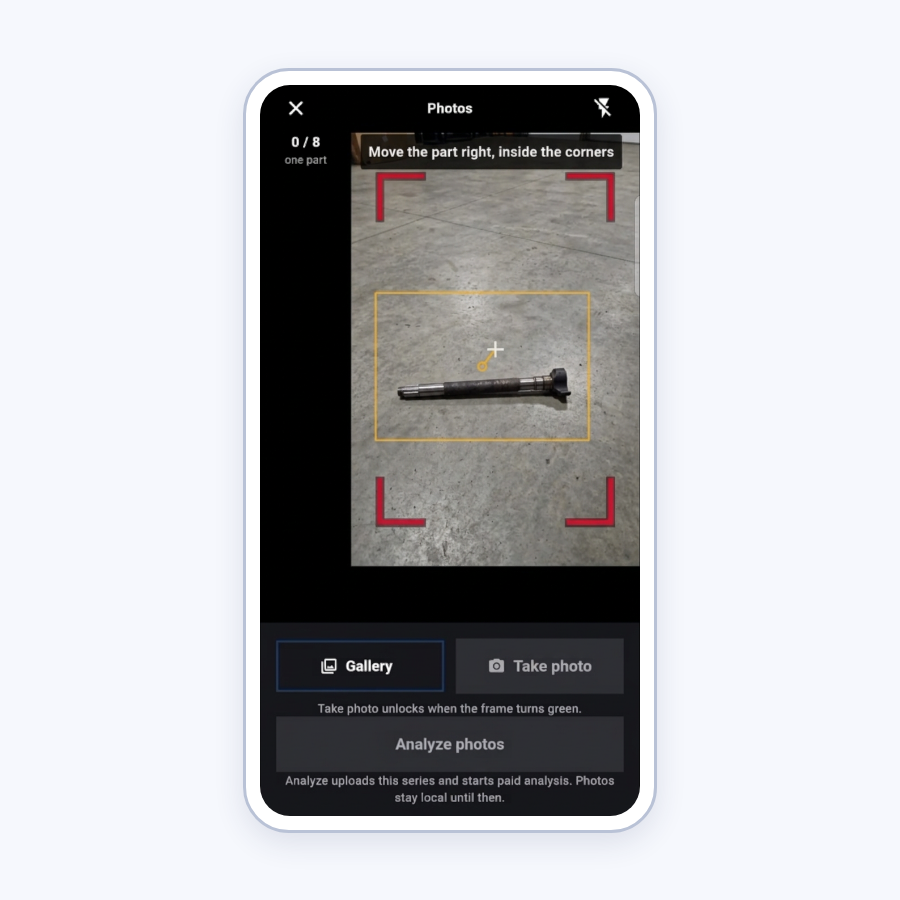
In the truck parts identification app, the user first takes one to eight photos. Before each shot, the camera checks the light, the framing and a steady hold. Then the app uploads the set and shows the stages: part type, preparation, features, questions, catalog and decision. A scan usually takes 25 to 50 seconds.
If the photos are enough, the app shows the part with its specification and interchangeable numbers. Otherwise, it moves on to a short question.
Questions instead of guesses
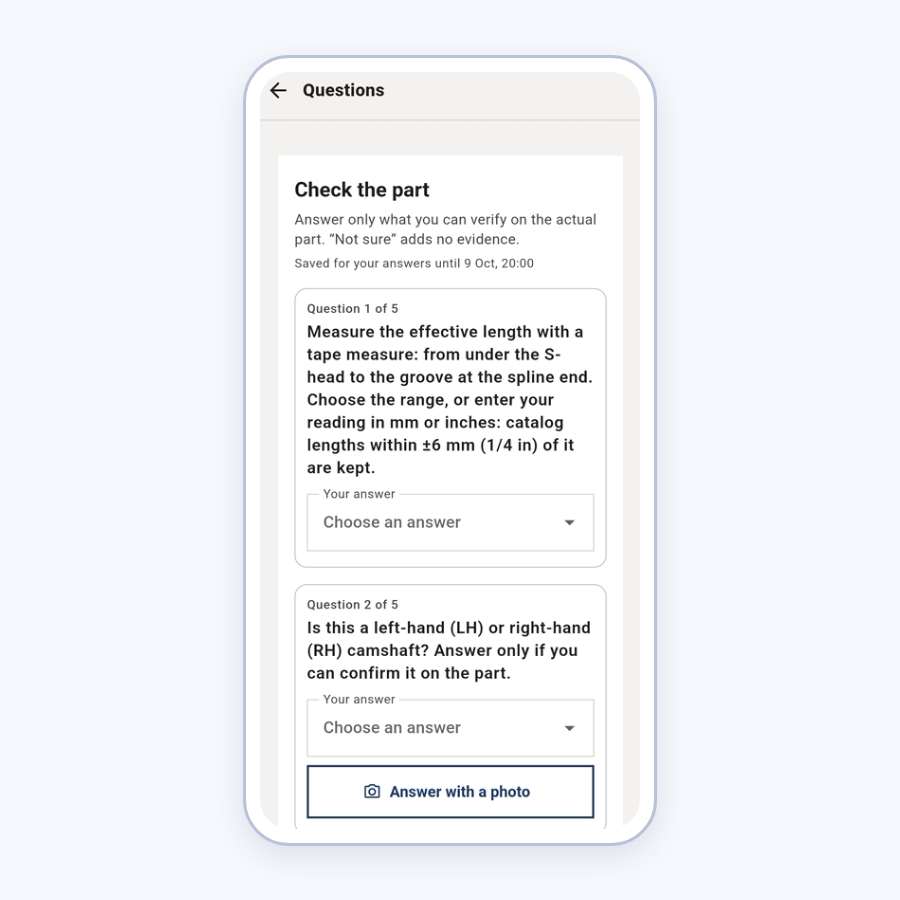
In truck parts identification, a wrong guess means an ordered wrong part, so the system asks when it is unsure. When several candidates remain, it asks about what actually separates them. It calculates which question removes the most uncertainty and asks at most three at a time. For example, it asks how many mounts the top plate has, or it asks for a length in millimetres or inches.
Because "Not sure" is always a valid answer, nobody has to guess. Moreover, the user can answer later, straight from the result screen. In that case the app repeats only the comparison, so it makes no new paid model call.
Honest results
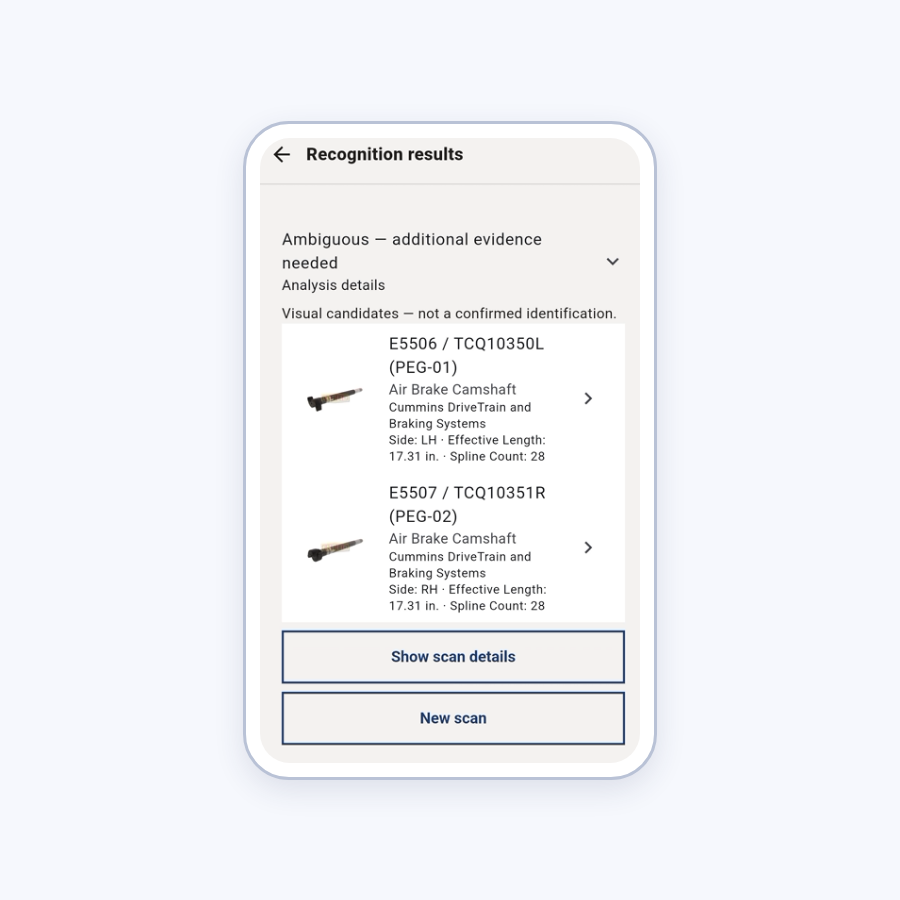
The result is always one of three states. Identified means the evidence is verifiable: a printed number, a known marking, or measurements the user confirmed. Close matches shows several candidates, what matched and what differs. Not identified says so plainly and suggests what to do next.
An incomplete result never passes for "no such part". Likewise, the app never shows its internal score as a percentage, because a score only orders the candidates and proves nothing.
Truck parts identification: three part types, three kinds of evidence
AIR SPRINGS
- Construction, mounts and ports of both plates
- Confidence capped on the two features the model misreads most
- A second model step only for pairs that code cannot separate
BRAKE PADS
- A number printed on the back of the plate
- A known marking punched into the plate
- Plate dimensions that the user confirms
- The outline, as the weakest evidence
BRAKE CAMSHAFTS
- Photos only rank candidates; they never eliminate
- Only measurements that the user confirms eliminate
- A final answer needs a confirmed left or right hand
What turned out to be hard
- Unstable reading. The model can describe the same photos slightly differently between runs, for example one air spring's bottom mount. So we added a confirmation step.
- Poor source photos. Photos of a laptop screen make printed codes hard to read. Therefore two codes of one pad now count as identification, while a single low-confidence reading only suggests.
- Cardboard backgrounds. A pad shot face-on on cardboard gave a wrong leader in one case out of four. For that reason such outlines now only rank candidates.
- Indistinguishable parts. Two camshafts differ in length by less than the tolerance. The app says so and returns a family of equivalent parts, not a false certainty.
- Gaps in the data. Plate dimensions exist for four pad families out of thirteen. We treat the rest as unknown, not as non-matching.
Speed and cost
The first version of the truck parts identification pipeline spent paid model calls on steps that plain code can do alone. So we moved those steps out of the model, one by one. A separate, cheaper model now detects the part type and never sees the catalog. Code compares pads and camshafts. A second model step runs only for the few air-spring pairs that code cannot separate.
As a result, the eighth version of the pipeline cuts the time per scan by 53 percent and the cost by 59 percent. A first scan of one part now costs about $0.3 to $0.5. These are internal measurements on our test photos.
How we check the quality of truck parts identification
- About 335 automated tests for the recognition agent, plus 45 for the media service and 19 for the catalog
- 138 tests for the mobile app, all against a fake backend
- Offline replays of saved model observations, so a rule change cannot silently break a correct result
- Paid scans only with explicit permission, and a live scan confirms a result but never serves for debugging
- A check on real parts: four brake pads, two air springs and three camshafts
Result and what's next
Today the truck parts identification system names parts of three types on the real photos we tested. It either names the part or narrows the choice to a family of equivalents, and it always explains why. In addition, the catalog shows 1,200 parts with specifications and interchangeable numbers.
Next, we plan to extend the recognition data to more part families and to decide on reading stamps on camshafts once legible photos are collected. After that comes a release build with user accounts and a scan history on the server.
Looking for similar work? See our mobile development services or read how we built a taxi fleet platform.
Need a truck parts identification app or a similar product? Tell us about your task.
SEE MORE OUR CASE STUDIES
Contact us
Please fill out the form, and we will get back to you once your request has been processed.
You can also send your request directly to our email: info@24gen.space
We will respond as soon as possible after receiving your message.